 RambackDownload
Your dev stack is using 11 GB.
Get it back.
Ramback shows every simulator, emulator, Gradle daemon, container and dev server eating your Mac's memory, and stops them in one click.
Free download for macOS 14+, Apple silicon and Intel. Every install starts with 14 days of Pro.
Live demo, not a video. Click the menu bar item, a row's stop button or Clean slate.
Works withXcodeAndroid StudioDockerOrbStackExpoFlutterClaude CodeCursor
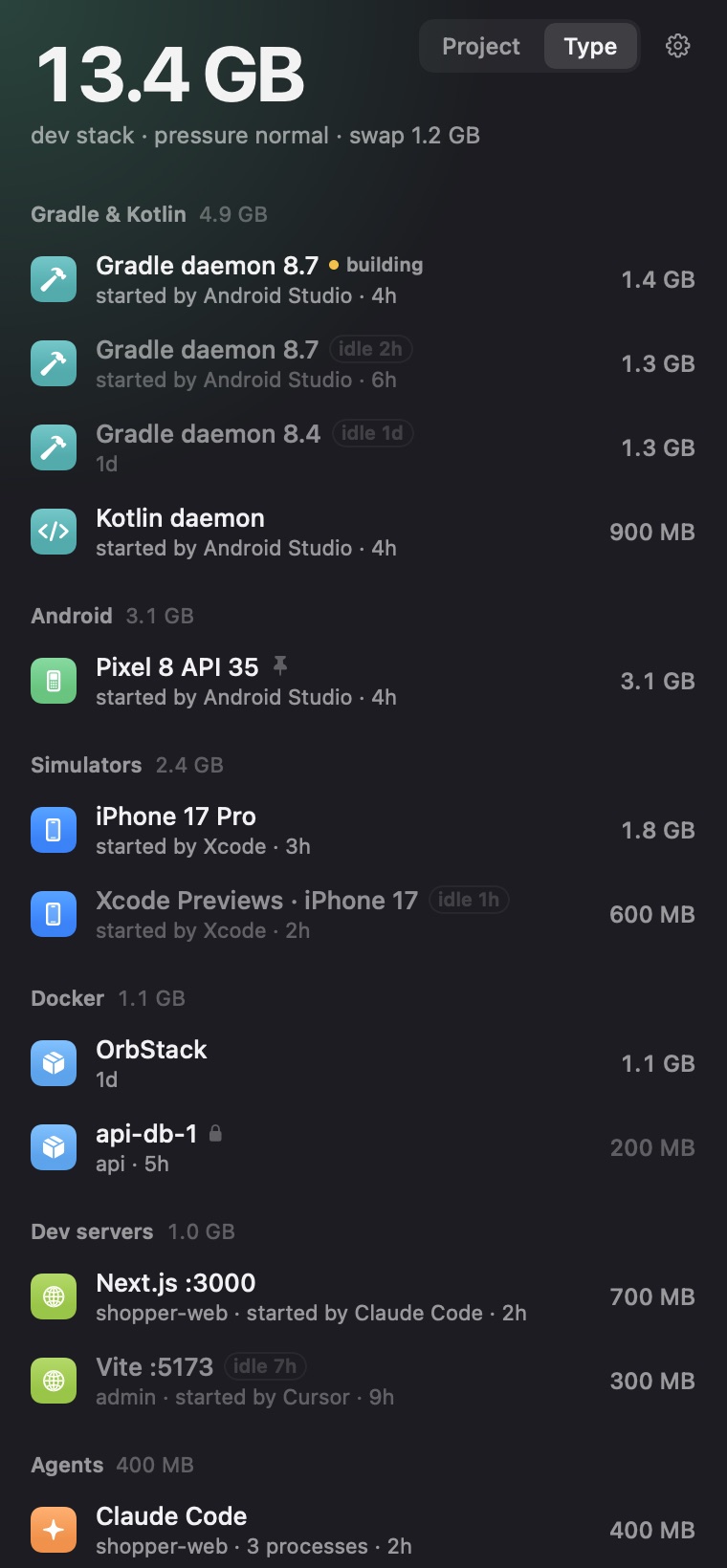
Three Gradle daemons, two dev servers your agents left running, and a simulator you forgot.
That's a normal afternoon. Ramback finds them in one pass over the process table and counts memory the way Activity Monitor does. Each row tells you enough to decide in a second:
- idle 2h
- Faded rows haven't done anything for that long. They're the first to go.
- building
- Mid-compile. Clean slate leaves it alone until the build is done.
- the lock
- Databases. They keep running until you stop them yourself.
- started by
- Claude Code, Cursor, Codex, Xcode, Android Studio or your terminal, read from the process tree.
New in 1.0
Rules instead of remembering.
One switch each, at most one number, no editor. Every automatic stop is logged, and with Pro, simulators, emulators and containers come back with Undo.
Rules
- When Xcode quits, shut down simulators
- When Android Studio quits, stop emulators and daemons
- Stop Gradle daemons idle for 60 min
- Stop dev servers idle for 3 hoursFree
- When an agent session ends, stop the servers it startedFree
- Clean slate before the Mac sleeps
The first three are on out of the box.
Same data, from the terminal.
A CLI and an MCP server ship inside the app, so agents can check before booting another emulator and stop their own servers when they're done. They can't touch databases, builds or what you pinned.
$ ramback status
Dev stack 3.7 GB · pressure warning · swap 4.4 GB · scanned in 181 ms

Databases
  MongoDB :27017                       0.1 GB  database · guarded · 1 proc
  PostgreSQL :5432                     0.0 GB  database · guarded · 6 proc
Xcode
  SWBBuildService                      1.4 GB  xcode · started by Xcode · 9 proc
ramback
  Claude Code                          0.4 GB  agent · not stoppable · 5 proc
# …and four more Claude Code sessions, 0.4–0.5 GB each
$ claude mcp add ramback -- /Applications/Ramback.app/Contents/Helpers/ramback mcpWhat Ramback never does
- Your database.
- Postgres, MySQL, Redis and Mongo are locked. No rule or agent stops them; you can, after a confirm.
- Anything mid-build.
- A broken build costs more than the RAM.
- Your files.
- Disk cleanup moves them to the Trash. Only caches that download again are removed for good, after a second yes.
- Your data.
- Process names, paths and projects stay on your Mac. Anonymous usage counts only if you opt in.
Free, or $19 once.
| Feature | Free | Pro $19 |
|---|---|---|
| Everything running, with RAM: stop, pin, Clean slate | ✓ | ✓ |
| Dev server and agent cleanup rules | ✓ | ✓ |
| Disk scan | ✓ | ✓ |
| CLI and MCP server for agents | ✓ | ✓ |
| Memory pressure warnings | – | ✓ |
| Simulator, emulator and sleep rules, with Undo | – | ✓ |
| Disk cleanup | – | ✓ |
| Activity log and weekly summary | – | ✓ |
Pro is a one-time payment for 2 Macs, with every 1.x update. Each install starts with 14 days of Pro, no card. 30-day refund, no questions. Team: one key for 10 Macs, $69.
Prefer the App Store? Ramback Lite, for ports and dev servers, comes later.
I built it for my own Mac first.
The terminal output above is mine, from an ordinary afternoon: memory pressure at warning, 4.4 GB in swap, and five Claude Code sessions holding half a gigabyte each.
Activity Monitor tells you something is using the memory. It doesn't tell you it's yesterday's simulator, or a dev server an agent started and never stopped. I wanted one list that does, and one button that stops the right things and leaves the database alone.
I'm building Ramback on my own. No company, no investors, so I can promise a few things directly:
- You pay once.$19 for 2 Macs, with every 1.x update. Nothing renews.
- Free stays useful.The full list, Clean slate, dev server and agent rules and the disk scan never go behind the paywall.
- It asks before it forces.Everything gets a gentle stop first. If something won't quit, you decide.
Questions
How is it different from Activity Monitor?
Activity Monitor lists processes. Ramback groups them by what they are (simulators, emulators, Gradle daemons, containers, dev servers, agent sessions), shows which tool started each one and how long it has been idle, and stops them the way their own tools do, with simctl, adb or docker instead of a kill.
Why isn't it on the Mac App Store?
App Store apps run in a sandbox that can't call simctl, adb or docker, or read ~/Library/Developer. That's most of what Ramback does. A smaller Lite version for ports and dev servers is planned for the App Store later.
Is it safe? What does it never stop?
It stops things gently first: simctl shutdown, adb emu kill, docker stop, or SIGTERM to the process tree. If something is still running after 5 seconds, it asks before forcing it. Databases only stop after you confirm, nothing mid-build is touched, and it never goes near root's processes, other users' processes or anything under /System.
What leaves my Mac?
Nothing about your work. Process names, paths and project names stay on your Mac. If you opt in, anonymous counts (what kind of thing was stopped, how often) go to TelemetryDeck. The only other calls are license checks with Polar and update checks with ramback.app. Privacy details →
Does it work with OrbStack, Colima or Podman?
Docker Desktop, OrbStack and Colima, yes. The VM counts toward the total, and containers show their share of it, grouped by Compose project. Podman isn't detected yet.
Does it work on Intel Macs?
Yes, it ships as a universal binary. It needs macOS 14 Sonoma or later.
Does it need Full Disk Access or Accessibility?
No. If your projects live in Desktop or Documents, macOS asks once so Ramback can read folder names to find project roots.
How do I free port 3000 on a Mac?
Open Ramback and stop the dev server listening on :3000, or run ramback stop :3000 in a terminal. It stops the whole process tree, so the port is actually released.
Why are Gradle daemons using so much RAM?
Every Gradle version, JDK and set of JVM options gets its own daemon, and each keeps 1–2 GB after the build ends. Ramback lists every Gradle and Kotlin daemon with its RAM and idle time, and a rule stops idle ones after 60 minutes.
Can it clear Xcode DerivedData and old simulator runtimes?
Yes. The Disk tab finds old simulator runtimes, DerivedData per project, iOS DeviceSupport, Android images no emulator uses and stale Gradle versions, and shows the total for free. Cleaning is Pro: your files go to the Trash, and only caches that download again are deleted for good, after a second yes.
Get your RAM back.
Free to download. Pro is $19 once, after 14 days of trying it.